
Bounce Rate Basics

Website bounce rate is the percentage of visits where a user lands on your site and then leaves without taking the kind of follow-up action your analytics considers meaningful. In simple terms, what’s the bounce rate? It’s a “one-and-done” visit rate for a page or for the site overall.
Bounce rate can be viewed at different levels. A bounce rate website number can describe the whole site, but the more actionable view is usually web page bounce rate by landing page, because bounce rate is tied to what the visitor experienced first.
What counts as a “bounce”
What counts as a bounce depends on the analytics platform.
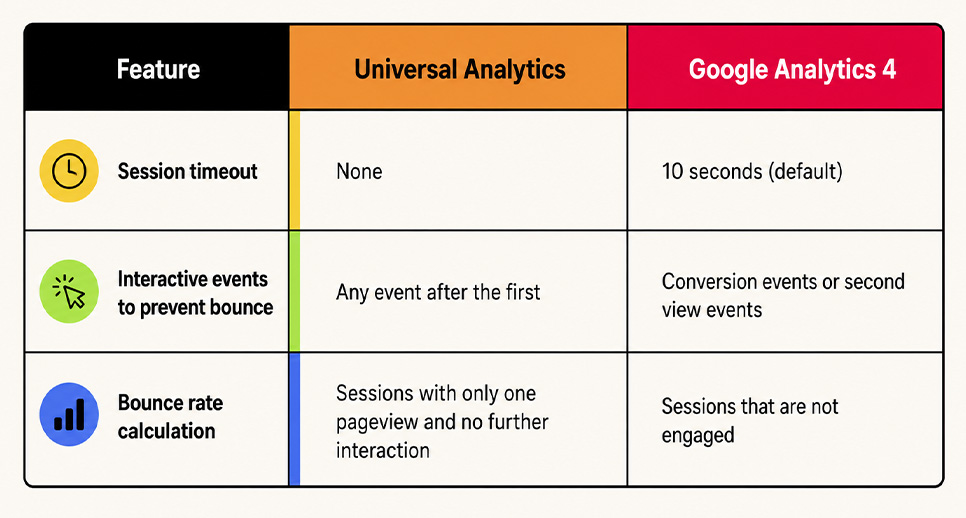
In Universal Analytics (UA), a bounce was a single-page session with no additional interaction hit. Someone could read for minutes and still count as a bounce if no tracked interaction fired.
In GA4, bounce rate is based on non-engaged sessions. It is the inverse of engagement rate. It is the percentage of sessions that were not engaged. An engaged session lasts longer than 10 seconds, or has 2 or more page views, or triggers a key event. This makes GA4 more behavior-sensitive than UA. As of 2026, GA4 keeps refining engagement and event tracking accuracy. Measurement settings like session timeout can also be adjusted.

How to calculate bounce rate
The core math is straightforward.
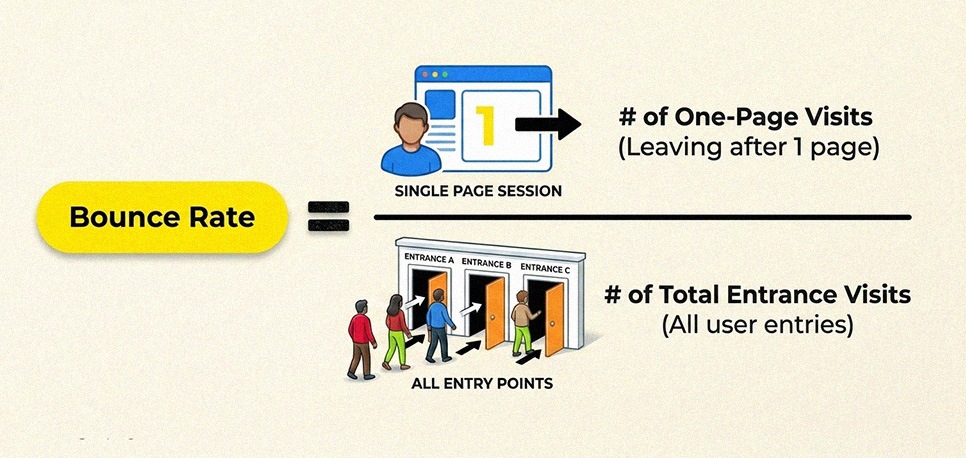
For UA-style thinking, bounce rate is often explained as: sessions with a single pageview and no interaction, divided by total sessions, multiplied by 100.
For GA4, the clean way to think about how to calculate bounce rate is: Bounce rate = (non-engaged sessions ÷ total sessions) × 100.
So if you have 1,000 sessions and 320 were not engaged, your web bounce rate is 32%.
How GA4 calculates bounce rate, vs Universal Analytics
This is the biggest point of confusion in “what is bounce rate” content. So it’s worth being precise.
In GA4, Google ties bounce rate to engaged sessions. Google defines bounce rate as the percentage of sessions that were not engaged. It is the inverse of engagement rate. In practice, many GA4 guides summarize an engaged session as meeting at least one condition. It lasts 10 seconds or more, it has 2+ page or screen views, or it triggers a conversion or key event. As of 2026, GA4 continues refining engagement tracking for better accuracy. It can also support custom engaged-session timers in tag or stream settings
That means GA4 bounce rate is not identical to the classic “single-page session” definition. A one-page visit can still be “engaged” if it meets the engagement criteria. A user can land on one page, stay long enough or trigger a key event, and not count as a bounce.
In Universal Analytics, bounce rate was more rigid. If the visitor viewed one page and did not trigger a second interaction, it was a bounce, even if they spent a long time reading. That’s why many sites saw bounce rate numbers shift when moving from UA to GA4. The metric is measuring something slightly different.
Bounce rate vs exit rate
Bounce rate and exit rate sound similar, but they answer different questions.
Bounce rate is about entry pages. It measures sessions where the user entered on a page and left without further meaningful engagement.
Exit rate is about where sessions end. A page can have a high exit rate simply because it’s the last step in a normal journey, like a confirmation page, a contact page after a phone number click, or the final step of reading. CXL summarizes it cleanly: bounce rate is the percentage of visits that were the only one of the session, while exit rate is the percentage of visits that were the last in the session.
So if you’re diagnosing a high bounce rate, you usually start with landing pages and intent matches. If you’re diagnosing drop-offs in a multi-step flow, exit rate is often the better lens.

Why Bounce Rate Matters
Bounce rate matters because it shows what happens right after a visitor lands on your site. It helps you spot pages where the first impression fails, where traffic is mismatched, or where the experience blocks the next step. When bounce rate is high on money pages, it often signals lost revenue opportunities before users ever reach conversion points.
Bounce rate as an engagement signal
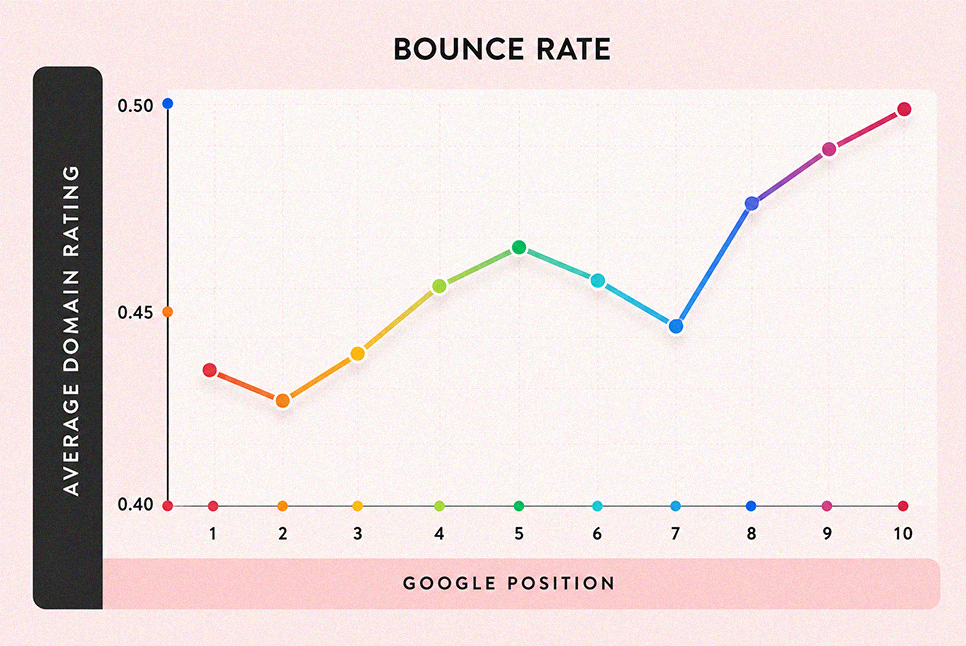
Bounce rate is useful because it’s a fast read on whether the first page experience worked. A website bounce rate that climbs after a content change, a layout update, or a new traffic campaign often signals that visitors did not find a reason to continue. Competitor guides frame bounce rate as a proxy for on-page engagement, meaning it helps you spot pages where the entry experience is weak or misaligned.
The key is interpretation. Bounce rate is most meaningful when the page is supposed to drive the next step. For example, a service page meant to push calls or form fills, a product page meant to push add-to-cart, or a landing page meant to move users deeper into the funnel. In those cases, a high bounce rate usually indicates friction, mismatch, or missing clarity.
Impact on sales
For ecommerce and lead-gen sites, bounce rate matters because bounces reduce the number of visitors who reach revenue-driving steps. Shopify explains that high bounce rates correlate with lower sales because visitors aren’t staying long enough to become customers, and they are less likely to purchase if they are not compelled to explore or engage.
This is why bounce rate marketing reviews typically start with entry pages. When the first page does not build trust or explain the offer quickly, users leave before they ever see your products, pricing, or differentiators.
Impact on conversion rates
Conversions require progression. A visitor can’t submit a form, start checkout, or complete a purchase if they leave immediately. That’s why bounce rate is often monitored alongside conversion rate in CRO workflows, especially on landing pages where the goal is one action. Shopify also connects bounce behavior to conversion outcomes by tying bounce rate to site engagement and the likelihood of becoming a customer.
So when you see the bounce rate is high on a high-intent page, the implication is practical. You are losing potential conversions before users reach the step that converts, which makes the page a priority for optimization.
Bounce rate vs engagement rate
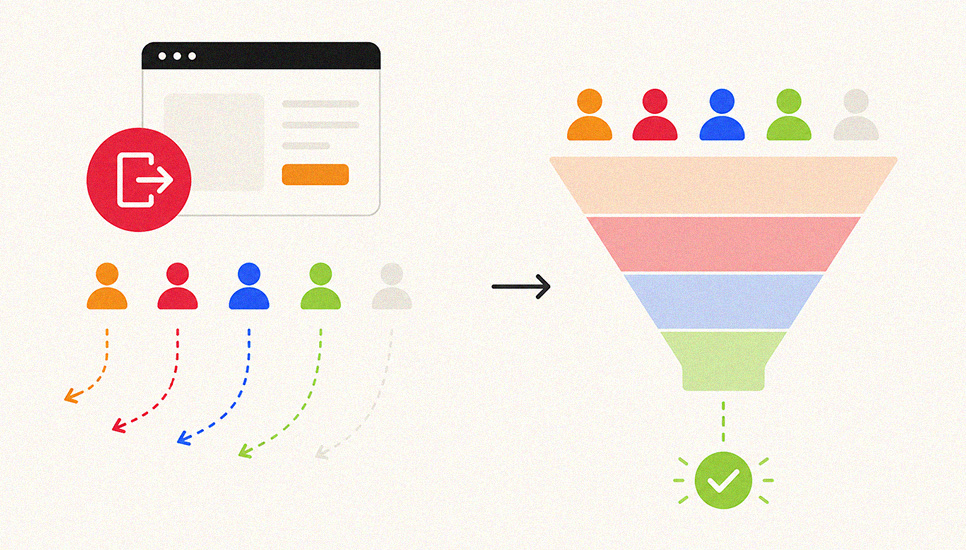
In GA4, bounce rate and engagement rate are paired metrics. Google states bounce rate is the opposite of engagement rate. It defines bounce rate as the percentage of sessions that were not engaged.
This pairing is useful because it changes how you read the metric. You do not only ask, “did they leave.” You ask, “did the session show meaningful engagement.” If engagement rate rises while bounce rate falls, your entry page experience is improving. If engagement rate drops and bounce rate rises, you likely have an intent match problem, a UX issue, or a traffic quality mismatch. As of 2026, GA4 continues refining engagement tracking for better accuracy, including improved event accuracy and custom engaged session timers.
Bounce Rate and SEO
Is bounce rate an SEO ranking factor
For bounce rate in SEO, the key point is simple. Google has repeatedly said it does not use Google Analytics bounce rate to rank pages. Google’s Gary Illyes has also said “we don’t use analytics. bounce rate in search ranking,” which matches that stance. So when people ask, “does bounce rate affect SEO,” the accurate answer is. Not as a direct ranking input.
After the December 2025 core update and the early January 2026 volatility, the focus on SERP satisfaction is clearer. If users click, then return quickly to results, that can signal poor intent match or weak UX. High bounce rates can be a symptom of the same issue. That is why bounce rate still matters. It helps diagnose content quality, UX friction, and internal linking problems that impact conversions and deeper engagement.
When bounce rate hints at intent mismatch
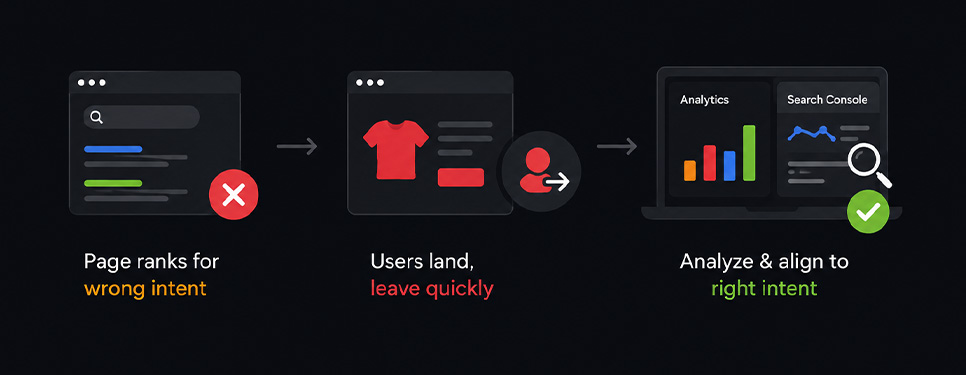
Bounce rate becomes SEO-useful when you treat it like a diagnostic, not a score. Semrush explicitly positions bounce rate this way. It can help you spot pages that don’t match search intent, don’t provide a good user experience, or don’t deliver quality content.
The “intent mismatch” pattern usually looks like this. A page ranks for queries that don’t match the offer or the answer, users land, realize it’s not what they searched for, and leave. John Mueller has even warned that improving engagement is not the goal if the visibility is coming from queries you don’t actually want. The real fix is aligning the page to the right queries and intent.
In practice, you diagnose intent mismatch by pairing bounce rate in analytics with Search Console query data for that landing page. If organic traffic lands from informational queries but the page is transactional, expect a higher bounce rate. If the snippet promise (title/meta) suggests one thing and the first screen delivers another, bounce rate often rises. This is the clean SEO use case for seo bounce rate. It helps you decide whether to adjust targeting, rewrite the page for the dominant intent, or create a dedicated page that matches the query set.
Benchmarks and “Good” Bounce Rates
Bounce rate benchmarks only matter in the right context. A good bounce rate changes by page purpose, industry, device, and traffic source. The goal is not chasing one ideal number. The goal is confirming whether bounce rate is normal for what a page is meant to achieve. In 2026, averages have moved slightly higher in many cases due to heavier mobile traffic and AI shaped search behavior. Fresh benchmarks improve credibility and strengthen E E A T signals.
What is a good bounce rate

A good bounce rate depends on context, but many references still converge on a practical rule. Around 40 percent or lower is often treated as good, while 55 percent plus is often treated as a range worth improving for many business pages.
For ecommerce, 2026 summaries commonly cite 45 to 47 percent overall, and below 45 percent is often considered strong. Use these ranges as a starting lens, then validate against intent and device mix.
Why “good” depends on intent and page type

Good depends on intent because different pages have different jobs. A quick answer page can deliver value in one view, so a higher bounce rate can still mean success. A comparison, quote, or checkout path is different, because the expected next step is deeper navigation. If bounce is high there, it often signals friction, weak message match, or slow experience. In 2026, this intent lens matters even more because users skim faster and exit earlier on mobile.
Bounce rates by website type
Bounce rates vary by website type, so compare like with like. Content sites such as blogs and news often sit around 65 to 90 percent. B2B sites often land around 25 to 65 percent because visitors research across pages. Ecommerce is now commonly framed around 45 to 47 percent overall in 2026, with high performing ecommerce often aiming under 45 percent. Certain landing pages like FAQs or glossaries can still run very high when they answer one question fast.
Average bounce rates by industry
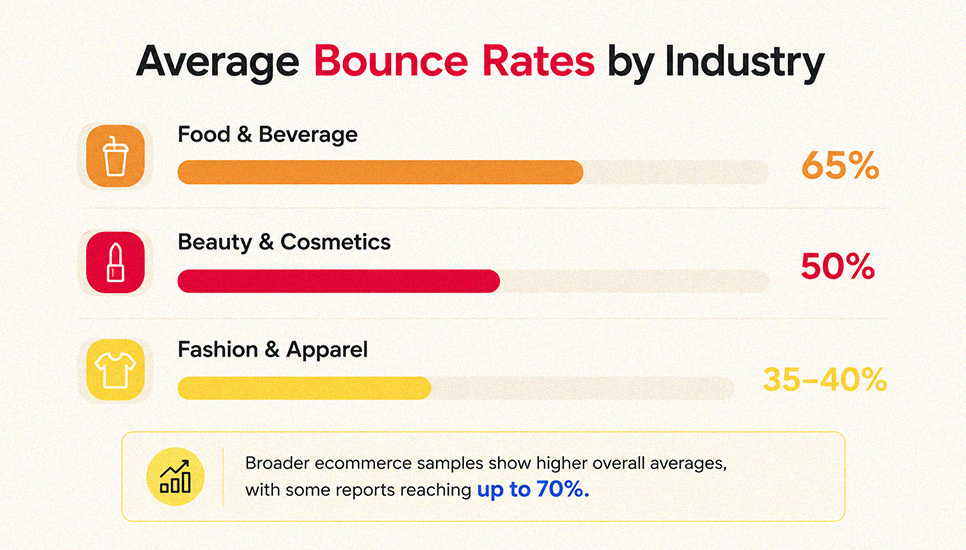
Industry benchmarks help set expectations, especially for ecommerce. In 2026 datasets, many vertical patterns are broadly stable but ranges are wider. Food and beverage often trends around 65 percent. Beauty and cosmetics often cluster near 50 percent, with variance by traffic mix and site speed. Fashion and apparel is commonly framed around 35 to 40 percent. Some broader ecommerce samples report higher overall averages, with certain reports reaching up to 59.92 percent across broader samples.
Bounce rate by traffic source
Traffic sources can shift bounce rate even when a site is healthy, so segment by channel and device. 2026 benchmarks are similar: Display ~56.50%, Social ~54%, Direct ~49.90%, Paid Search ~44.10%, Organic Search ~43.60%, Referral ~37.50%, and Email ~35.20%. Add a mobile lens too. Mobile bounce is often 10 to 20% higher than desktop, and many teams use ~50% as a starting point for mobile sessions. Desktop averages are often lower.
Display advertising
Display advertising often produces the highest bounce rates because many clicks come from broad targeting, accidental taps, or low intent curiosity. A benchmark near 56 percent is still commonly referenced, and mobile heavy placements can push it higher. Treat this channel as a message match test. If users bounce instantly, tighten audience filters, align creative to the landing promise, and improve load speed. Small improvements in relevance and first paint can reduce wasted spend quickly.
Social media traffic
Social media traffic often bounces high because users arrive while scrolling, consume one item, then return to the feed. A benchmark near 54 percent is still widely cited, and mobile consumption can lift it further. The fix is intent shaping plus speed. Keep headline continuity from the post to the landing. Reduce page weight. Place one clear next step above the fold. When social visitors see a fast page and a simple path, sessions deepen.
Direct traffic

Direct traffic often sits around a 50 percent bounce rate because it blends loyal visitors with quick task visitors. Some users type a URL to check hours, pricing, or a login, then leave. That can be normal. To reduce unnecessary bounces, clarify navigation, add internal links that match common tasks, and surface key paths like contact, quote, or booking early. In 2026, direct traffic quality also depends on mobile experience, so keep core pages fast and easy to scan.
Organic search
Organic search often averages around 43 to 44 percent in benchmark tables, but intent sets the real target. A quick definition or address query can bounce and still be a win. A comparison query should usually continue deeper, so a higher bounce there can signal weak alignment. In 2026, AI features can change who clicks through, so measure by query groups and landing types. Improve organic bounce by matching titles to on page answers and speeding up first interaction.
Email marketing

Email marketing typically bounces lowest because clicks are pre qualified. A benchmark near 35.2 percent is commonly cited, but it rises when emails oversell or when landing pages load slowly on mobile. Keep subject lines accurate, match the hero copy to the email promise, and remove friction in forms and checkout steps. Segment lists align with user intent, and test send time and device rendering. In 2026, mobile first email landings are essential for keeping engagement strong.
When a high bounce rate is normal, especially content pages and some landing pages
A high bounce rate can be normal when a page is designed to complete the visit in one stop. Content pages, glossaries, FAQs, and some landing pages can work this way, especially for a question. The deciding factor is the outcome. If the primary goal is achieved, bounce alone is not a problem. Pair bounce rate with scroll depth, time on page, and conversions. In 2026, this combined view matters more because users exit faster after getting what they need.
What Causes a High Bounce Rate

A high bounce rate usually means the first page experience failed to earn a next step. The most common causes come down to speed, relevance, usability, technical stability, snippet-to-page alignment, and mobile friction. Identifying which one is driving your website bounce rate is the difference between guessing and fixing.
Slow page load times

Slow loading is one of the most common high bounce rate reasons because visitors decide before they even see your content. If the page feels laggy, the first impression is “this site is hard to use,” and the session ends early. Competitor guidance consistently ties high website bounce rate to speed and performance issues, especially on mobile connections.
Irrelevant or low-quality content
When people ask “why is my bounce rate so high,” the most frequent root cause is relevance. The visitor clicked expecting a specific answer, product, or next step, and the page didn’t deliver that promise quickly. AB Tasty highlights that poorly targeted keywords can pull in visitors who are not actually interested in the page, which increases bounce rate website numbers even if nothing is technically broken.
Poor UX or bad design
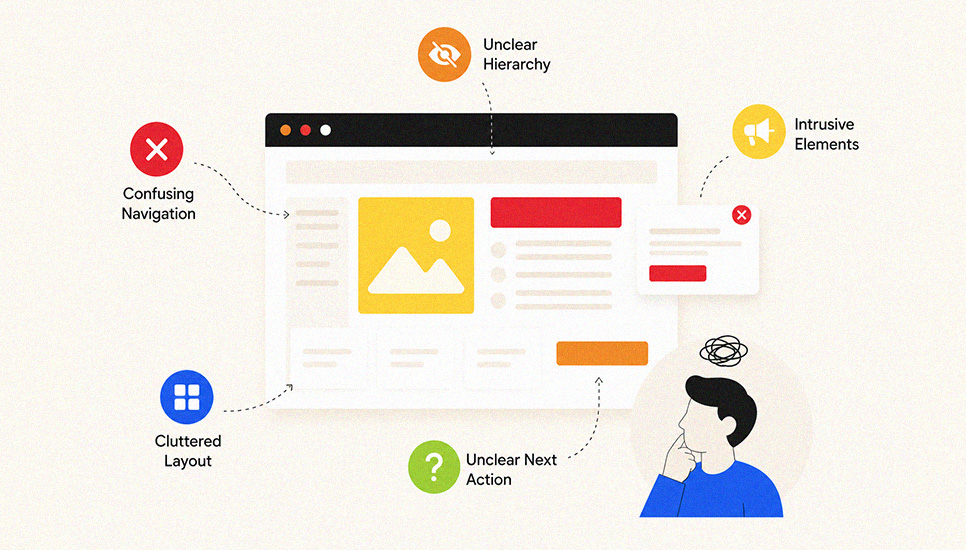
UX issues create “silent exits.” The visitor feels confused, distracted, or overwhelmed, so they leave rather than hunt for the next action. This includes intrusive elements that interrupt reading, cluttered layouts, unclear hierarchy, and pages that don’t make it obvious what to do next. Shopify notes that high bounce rates are often caused by poor user experience, even when the content itself is fine.
Technical errors
Technical problems cause bounces because they break trust and usability. That can be obvious, like broken pages or functionality that doesn’t work, or subtle, like scripts failing so the page behaves oddly. Shopify’s landing page guidance points out that technical issues can push people away before they engage, which directly elevates bounce rate.
Mismatched metadata
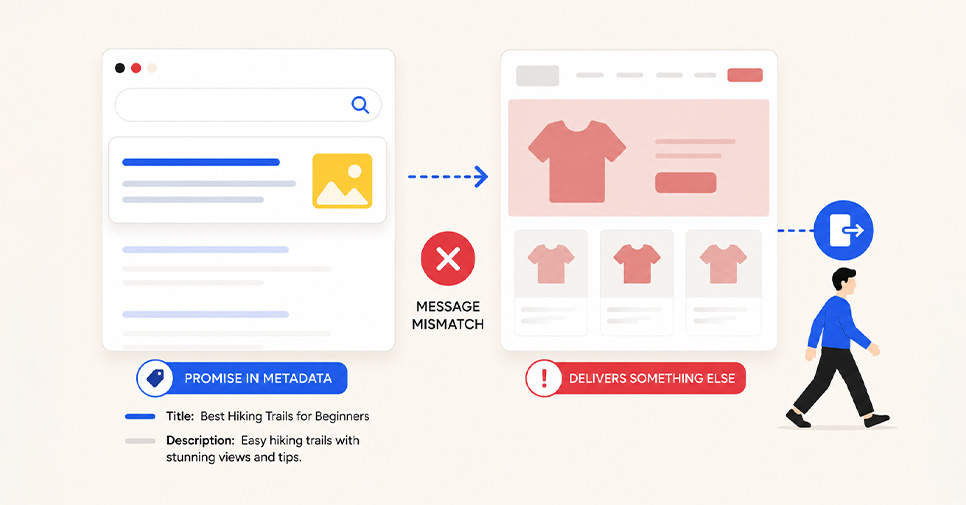
Metadata mismatch happens when your title and description suggest one thing, but the page delivers something else. The click was earned by a promise, but the first screen doesn’t confirm that promise, so the visitor exits. Competitor playbooks treat this as a core bounce-rate driver because it affects the “message match” from search, ads, and social to the landing page experience.
Not optimized for mobile devices
Mobile bounces often come from friction. Text is hard to read, buttons are hard to tap, popups cover the content, or key details are buried. Even if your desktop experience looks great, mobile users will bounce if the page is difficult to navigate or slow on a phone. Semrush and Shopify both emphasize UX and speed improvements as primary levers to reduce bounce rate and how to decrease bounce rate of a website in real conditions.
Measurement, Tracking, and Diagnostics
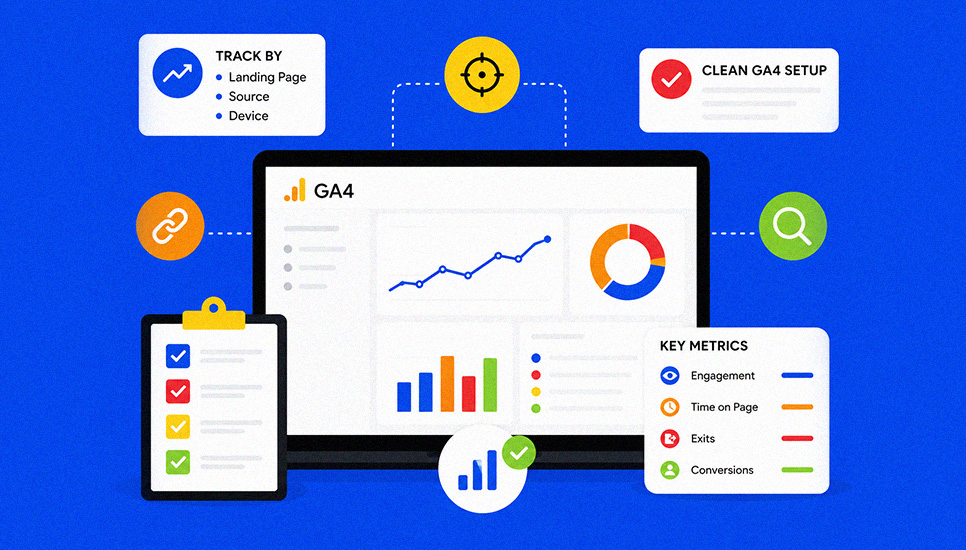
Measurement is where bounce rate becomes useful. When you track it by landing page, source, and device, you can separate real user problems from reporting noise. A clean GA4 setup plus the right supporting metrics turns bounce rate into a reliable diagnostic instead of a misleading vanity number.
How to measure bounce rate
To measure bounce rate correctly, start by deciding what you’re evaluating. A whole-site website bounce rate can hide problems because strong pages and weak pages average out. The more useful view is bounce rate on a website by landing page, then by channel and device. Once you’ve narrowed the scope, compare periods. For example, before and after a redesign, a campaign launch, or a content update. This is how bounce rate analysis becomes actionable instead of just a number in a dashboard.
Where to find bounce rate in Google Analytics
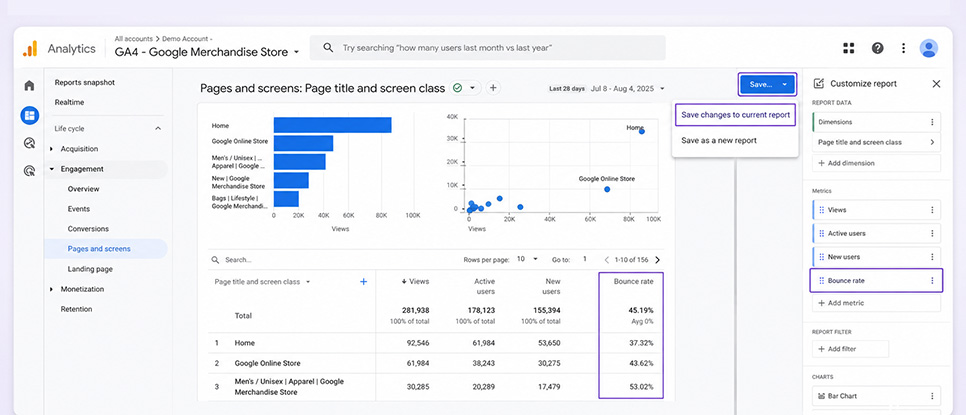
In GA4, bounce rate isn’t always visible by default in standard reports. Google’s guidance is to open a report like Pages and screens, then customize the report and add “Bounce rate” as a metric. Many GA4 walkthroughs reference the same workflow, Reports, select the report, customize, add the metric, then save if you want it to persist. This is the simplest answer to “what is bounce rate Google Analytics” and “how to check bounce rate in Google Analytics,” because you’re seeing it inside the same place you review page performance.
Check your tracking code setup, troubleshoot GA4
A sudden bounce rate change reminder. Sometimes the site did not change, the measurement did. If your bounce rate is high overnight, verify that GA4 is collecting data properly before you rewrite pages. Start with the basics. Confirm you’re looking at the correct GA4 property and web data stream. If you need to validate setup, the GA4 measurement ID lives in Admin, Property, Data Streams, Web, and it identifies the stream that should be receiving data.
Next, sanity-check the behavior signals that influence GA4 engagement. If key events stop firing, more sessions can look unengaged. If events fire too aggressively, you can artificially lower bounce rate because sessions get marked engaged when they shouldn’t. This is why troubleshooting usually includes reviewing recent tag changes, consent settings, and whether core events are firing consistently on key templates like blogs, landing pages, and product pages.
Do all analytics tools measure bounce rate the same way
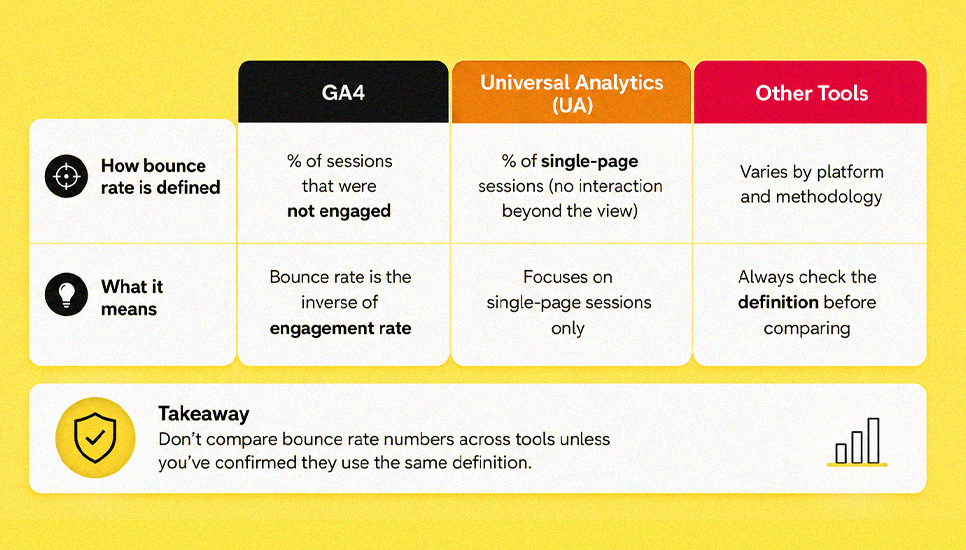
No. Do all analytics tools measure bounce rate the same way is a common confusion point, because definitions vary across platforms and versions. GA4 defines bounce rate as the percentage of sessions that were not engaged, and positions it as the inverse of engagement rate. Older analytics approaches, and some tools today, still treat bounce rate closer to “single-page sessions.” GA4 is also more event-driven overall, which changes how bounce is interpreted compared to older reporting models. The practical takeaway is to avoid comparing bounce rate numbers across tools without confirming they’re using the same definition.
What to pair with bounce rate, conversions, pages per session, time, engagement
Bounce rate is most valuable when you pair it with outcome and depth metrics. If bounce rate rises but conversions hold steady, the page might still be doing its job, especially for call-driven or single-answer pages. If bounce rate rises and conversions drop, you likely have a real problem. Pair web bounce rate with conversion rate or key events, engagement rate, average engagement time, and pages per session to understand whether visitors are leaving because they are satisfied quickly, or leaving because the page failed.
The fastest diagnostic pattern is. Compare bounce rate with engagement rate and conversions on the same landing page, then segment by traffic source and device. That approach answers “check site bounce rate” in a way that leads directly to priorities, which pages need fixes, which channels are sending mismatched clicks, and where tracking may be distorting the story.
How to Reduce Bounce Rate
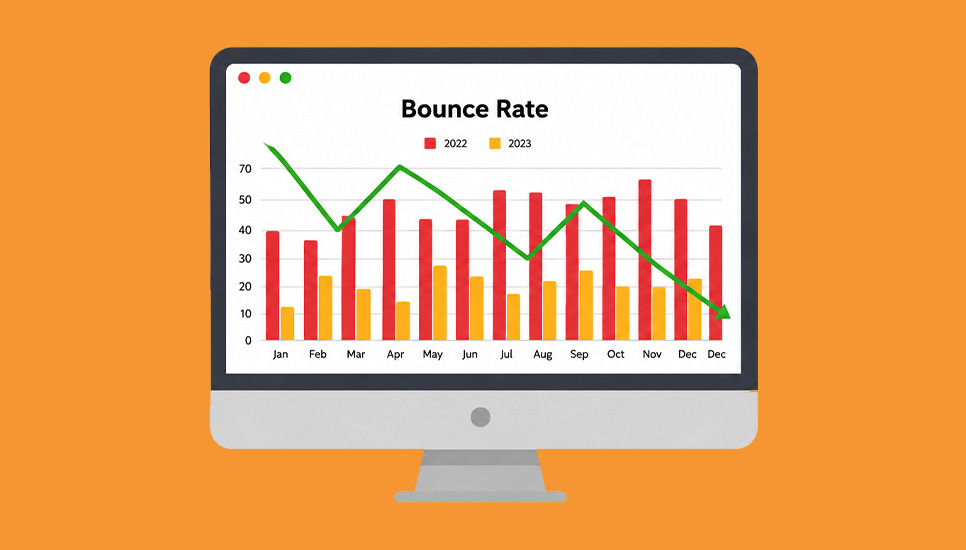
Optimize site design
If your goal is to reduce bounce rate, start with the experience visitors feel before they read a word. Many “bounce rate is high” cases are design and usability problems, not content problems. Competitor guides repeatedly connect website bounce rate improvements to faster load, clearer structure, and less friction in the first screen.
Improve site speed
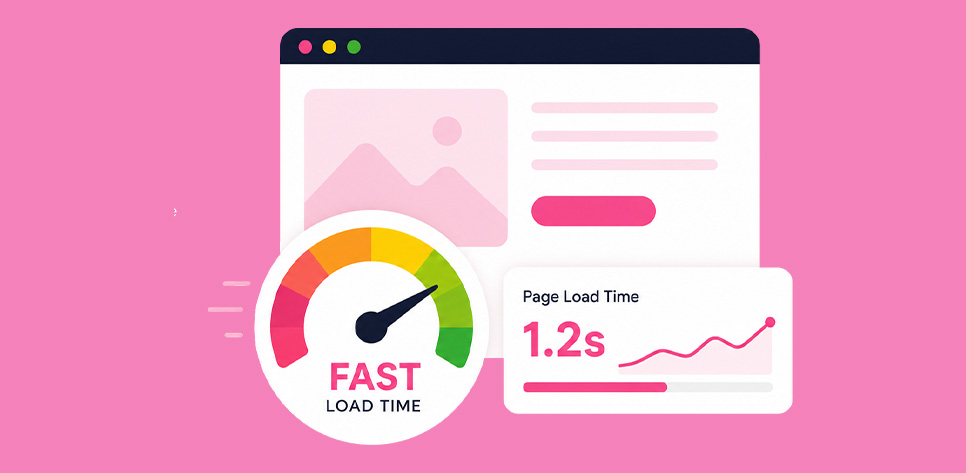
Speed is the fastest lever for how to decrease bounce rate on website because it affects every visitor. Shopify calls out slow page load times as a common cause of high bounce rate and positions speed improvement as a core fix. Backlinko also includes loading speed as a direct bounce-rate improvement step. When pages load quickly, fewer sessions end before the visitor even sees the value.
Simplify navigation
Navigation impacts bounce rate because it answers the visitor’s silent question. “Where do I go next?” When menus are cluttered, CTAs compete, or the path forward is unclear, users leave. Shopify lists poor UX or bad design as a cause of high bounce rate, and “simplify the experience” is one of the most consistent competitor recommendations.
Optimize for mobile

Mobile visitors bounce when the page is hard to use. Text is cramped, buttons are too close, popups cover content, or key info is below multiple scrolls. Shopify explicitly includes lack of mobile optimization as a cause of high bounce rate. So if your bounce rate website analytics shows higher bounce on mobile, treat it as a design and layout problem first, then revisit content.
Produce relevant content
Once the experience is usable, content relevance becomes the next driver. The easiest way to improve bounce rate is to make sure visitors feel they landed on the right page within seconds. AB Tasty ties high bounce rate to poor relevance, including targeting the wrong keywords and drawing the wrong audience.
Give visitors what they want, satisfy user intent
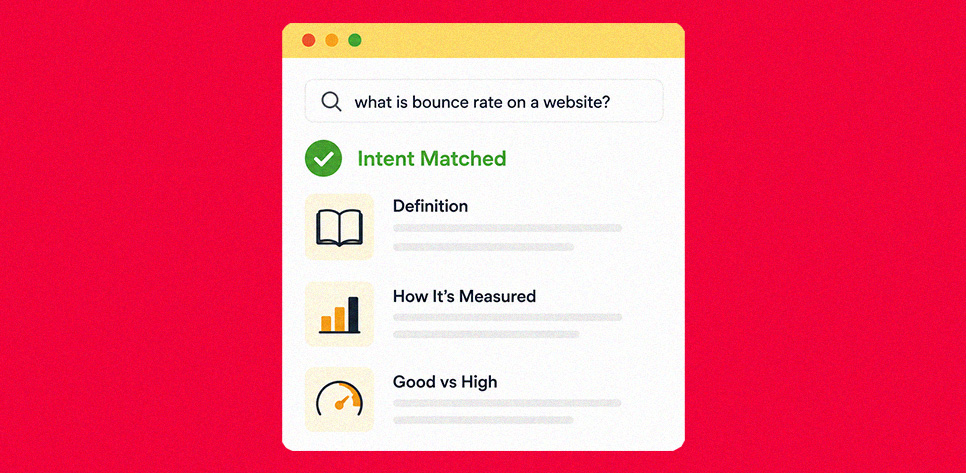
Intent match is the most direct content fix. If people search “what is bounce rate on a website,” they expect a definition, how it’s measured, and a quick way to interpret “good” vs “high.” If they land and see vague marketing copy, they bounce. Backlinko repeatedly emphasizes matching content to search intent as a top bounce-rate improvement strategy.
Practice thoughtful internal linking
Internal links reduce bounce by giving users a natural next step. Not random links. The next most helpful page in the journey. Backlinko specifically recommends adding internal links to improve bounce rate. This is especially effective on informational pages. One link to a related explainer, one link to a deeper guide, and one link to a product or service page when it makes sense.
On-page engagement and readability tactics
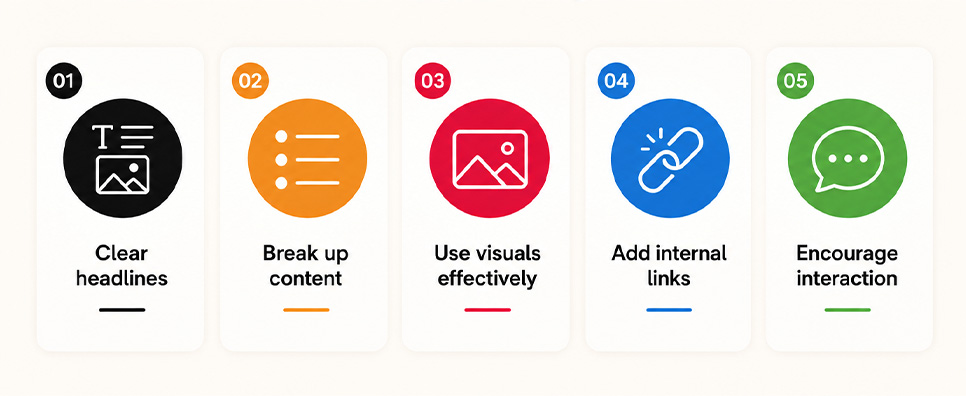
After intent is matched, the job becomes keeping the page easy to consume. Competitor tactics focus on reducing friction in reading and increasing micro-engagement so the session doesn’t end prematurely.
Enhance content with videos, embed videos
Video can lower bounce because it gives visitors another way to absorb the message without scanning long text. Backlinko recommends embedding videos on the page as a bounce-rate improvement tactic.
Sprinkle in bucket brigades
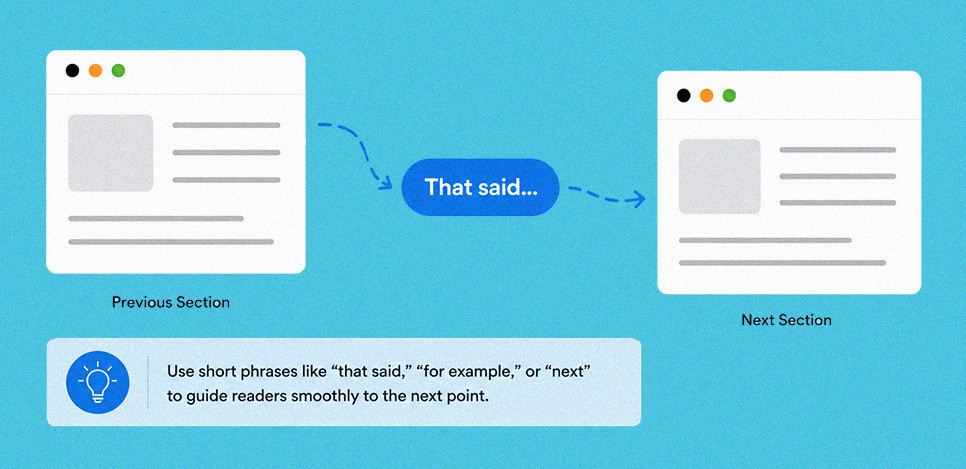
Bucket brigades are short transition phrases that keep readers moving through the page. Backlinko lists them as a technique to improve bounce rate by keeping attention flowing. Use them lightly, only where the reader would otherwise drop.
Optimize above-the-fold experience
Above-the-fold is where users decide whether to stay. If the headline, first lines, and layout do not confirm the promise of the click, bounce rate rises. Backlinko explicitly calls out improving above-the-fold experience to reduce bounce.
Improve content readability and skimmability
Readable content reduces bounce because visitors can find what they need fast. Short paragraphs, descriptive subheadings, and clean typography reduce cognitive load. AB Tasty highlights readability as an improvement lever for lowering bounce.
Make content easy to traverse with jumplinks
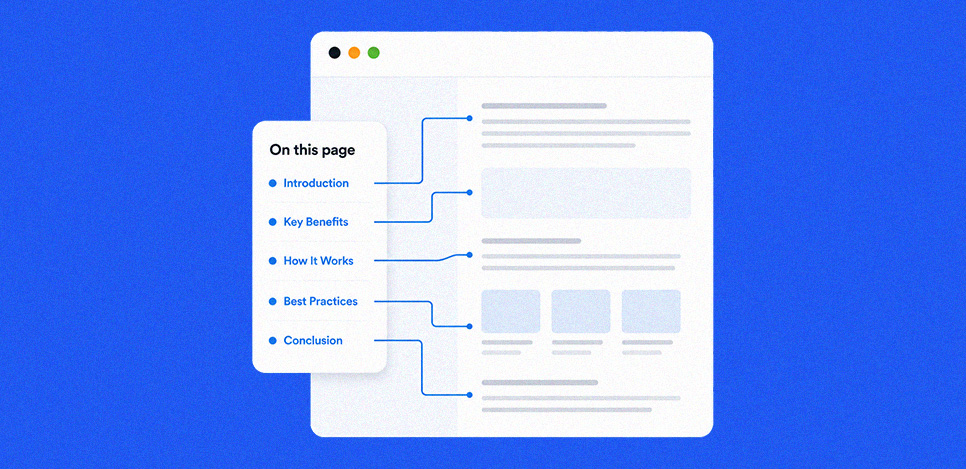
Long pages bounce when users feel lost. Jump links, or a table of contents, let users navigate directly to the section they want. Backlinko recommends adding a table of contents with jumplinks as a bounce-rate improvement tactic.
Remove unused plugins and scripts
Extra plugins and scripts often add weight, conflicts, and delays. That affects speed and stability. Shopify lists technical errors and slow load as common bounce drivers, so reducing unnecessary scripts is a practical bounce-rate optimization step.
Improve keywords targeting and snippet alignment, titles and meta descriptions
A high bounce rate from organic search often points to a promise problem. Your title and meta description attract the click, but the page does not immediately match the expectation. AB Tasty explicitly mentions lowering bounce rate with meta descriptions, because better alignment reduces wrong clicks. This is where “bounce rate in SEO” becomes useful. Not as a ranking factor, but as a signal that your snippet and page content are misaligned.
Continuous optimization

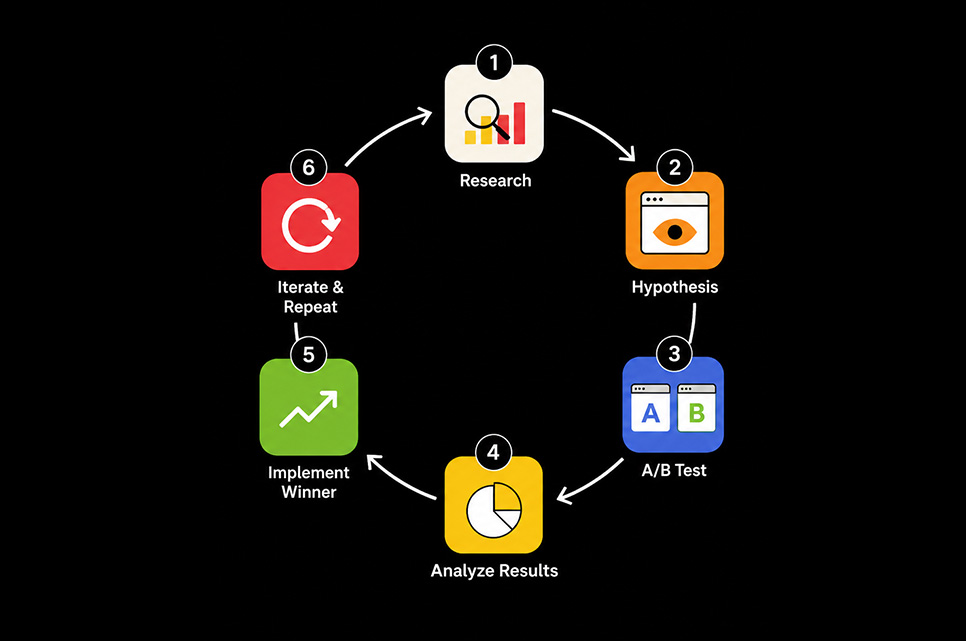
The best bounce rate improvements are iterative because every audience, channel, and page type behaves differently. You set a baseline, test changes, then re-measure.
A/B testing and iteration
A/B testing helps you isolate what actually moves web bounce rate and conversions, instead of guessing. Shopify includes ongoing optimization as part of reducing bounce rate, and A/B testing is one of the cleanest ways to validate improvements to layout, copy, and CTAs.
Transition. After you apply these fixes, the next step is troubleshooting edge cases, like when bounce rate jumps suddenly after tracking changes, or when one traffic source shows abnormal bounce despite stable content and design.
COLAB DXB Bounce Rate Optimization for Revenue-Driven Websites
Bounce rate drops when visitors instantly understand what to do next and the page loads without friction. High bounce can be normal for quick-answer content, but it becomes a growth problem when landing pages, service pages, and product flows fail to move users toward conversions.
As a web design and development agency, COLAB DXB reduces bounce rate by aligning page intent with traffic intent, tightening above-the-fold messaging, and improving navigation paths that guide visitors deeper. We fix mobile layout issues, stabilize visual hierarchy, and remove scripts that slow interaction. On the measurement side, we audit GA4 events to confirm bounce rate reporting is reliable, then pair bounce data with engagement rate, scroll depth, and conversion actions to identify real drop-off causes.
The result is a cleaner user journey, stronger lead quality, and higher revenue per session. Want a bounce rate plan built for performance. Contact COLAB DXB today.


About The Author
Sid hasan
Sid Hasan is an entrepreneur and marketing strategist recognized for his expertise in brand growth, digital innovation, and business development. With over a decade of experience, he has guided companies in building data-driven marketing ecosystems that generate measurable results.
As the founder of COLAB Marketing Inc., Sid leads a global agency serving over 200 brands across the U.S. and UAE, blending creative storytelling with performance-driven strategy to help businesses scale effectively.
Through COLAB, he continues to empower emerging and established brands to transform ideas into lasting market impact through strategic clarity, creative execution, and digital excellence.
